I think it’s been around 5 years, I switched to linux. I also try to understand linux deeply, through config, unix tools, using CLI tools and so on…
But I never tried to truly understand how linux file permission works. when i want to execute a file, I always used:
chmod +x <script_file>
But recently I explored on how there permissions works and why is it important, and why one should learn about it
What are Permissions and Ownership?
Permission goes hand in hand with ownership. Permission define who can access a file or directory and what actions they are allowed to perform.
Types of Permission
read(r): These permissions decide whether a file can or cannot be read.write(w): These permissions determine whether a file can bemodified.execute(x): These permissions determine whether a file can beexecutedas aprogram, required forscriptsandbinaries.
Without execute permission on a directory, you cannot traverse or access files inside it, even if you know their names.
Executable binariesrequire execute permission to be run.
Why permissions matters
I always wondered and sometimes annoyed to change a file permission and work with it. But as I work on many things for some time, I understand the importance of permissions. It’s always recommended to just give the minimum/enough permission to avoid unwanted complications. Because, minimum required permissions allow an account to work on the requirements, but also restricts the accounts from accessing unwanted files or operations they shouldn’t perform.
Always restrict the account to only work on what they needed to work on
Types of accounts
owner: The owner is the account, which have access to modify the permission of a file.group: A group is like a pool/group ofusers, who sharesame permissions.others:othersare all other users, who are neither thecurrent usernor auserbelongs the sameuser groupof the file.
An example of permissions
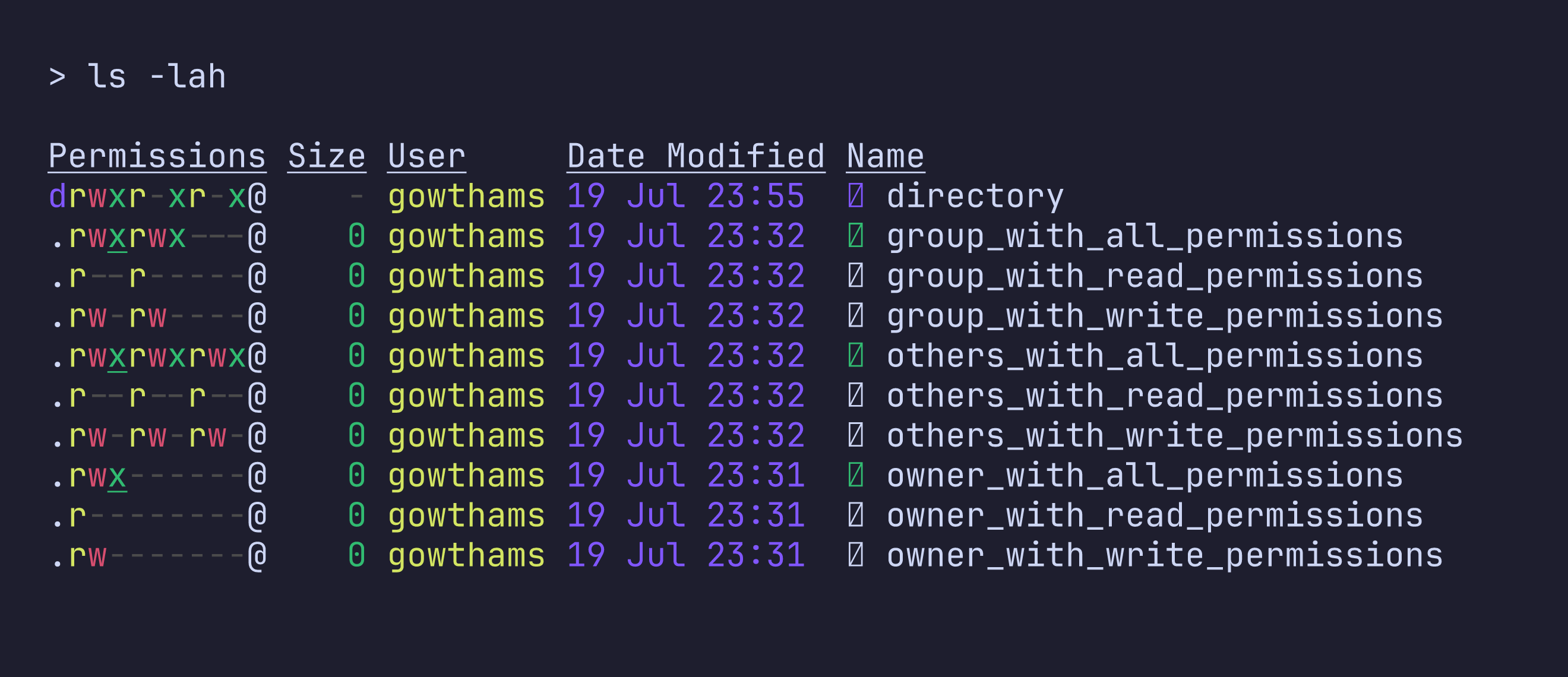
The first column in the images shows how every type of account have different versions of permissions:
- The first
./-/ddefines, whether anodeis afileor adirectory../-defines afile, whileddefines a directory - The next three represents the permission allowed for the
owner, like whether theownerhaveread,writeandexecuteaccess. - The next three represents the permission allowed for the
user group. - The next three represents the permission allowed for the
others.
How to change permissions?
When dealing with changing permissions in linux, it can be handled in 2 ways:
- whether to change the
ownershipof the file. - whether to change the
permissionof the file without affecting the ownership.
Changing the ownership of a file
To change the ownership of a file, we use:
chown <user_name> <file_name>               # to change the ownership to a user
# or
chown <user_name>:<group_name> <file_name>  # to change the ownership to a user alongside the user group
Changing the permission of a file
To understand how to change the permission of a file, first we need to understand the linus permission numbering system. linux uses a numerical method to identify file permissions
- 4 — read access
- 2 — write access
- 1 — execute access
Any combination of these can be used, like
0(---), 6(rw-), 5(r-x), 3(-wx).
now to change the permission, use:
chmod
    <4/2/1/6/5/3>\ # owner permission
    <4/2/1/6/5/3>\ # group permission
    <4/2/1/6/5/3>\ # others permission
<file_name>
Common file permissions
some of common file permissions include:
- 644 - File Baseline
- 755 - Directory Baseline
- 400 - Key Pair
Conclusion
Understanding permissions helped me understand why restrictions play such an important role in any system.